User Management#
Availability of support for the various roles and their corresponding permission sets.
- To access the user management feature, click on the Navigation Panel and select User Management.
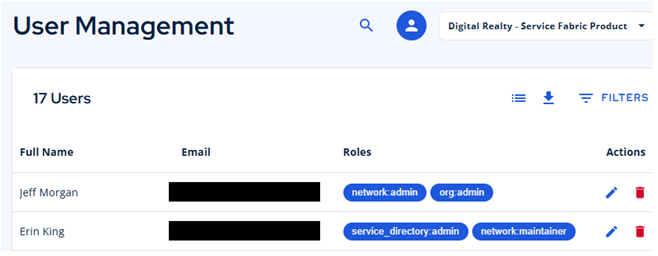
- From the User Management Dashboard, you can view or edit each user’s role. To edit, click the pencil icon.
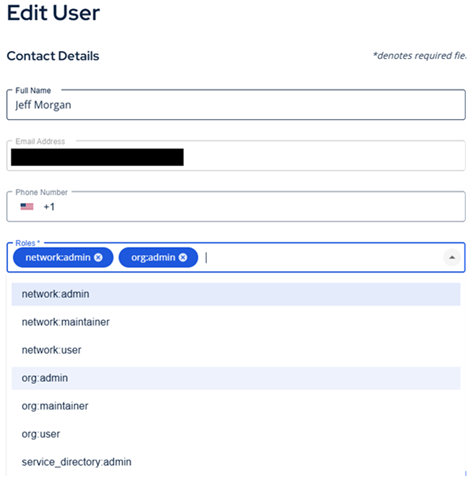
- The drop-down menu allows you to add or remove roles. After finishing, simply select Save Changes.
Role Overview#
A role is a collection of privileges given for a specific job function.
Account Administration#
This role has access to all the information and resources related to that customer, including read-only and write-only. Users within the customer organization can be modified and the Account Admin can alter the rights of any user.

To set up Account Administration add these roles to a user:
- org:admin
Network Administration#
This role has read-only access to existing resources and has the ability to add and delete resources, such as links and connections.
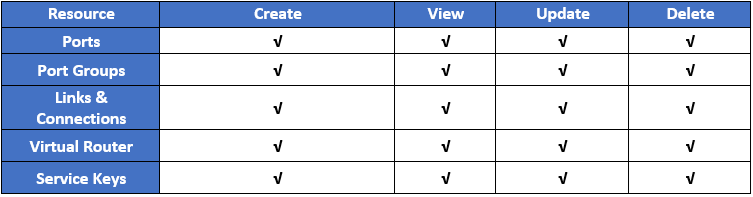
To set up Network Administration add these roles to a user:
- network:admin
View-only User#
This role has read-only access to existing resources.

To set up Customer User add these roles to a user:
- org:user
View-only Auditor#
This role has read-only access to all the information and resources related to that customer.
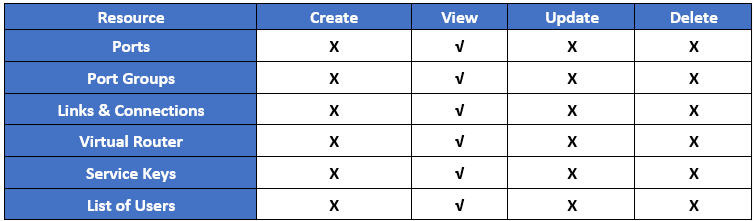
To set up Customer Auditor add these roles to a user:
- org:user
- network:user