Obtain Authorization for Port/Port Group Setup#
To create the cross-connect to the newly defined port, you must authorize the connection to your ServiceFabric® port by submitting a Letter of Authorization (LOA).
Obtain LOA(s)#
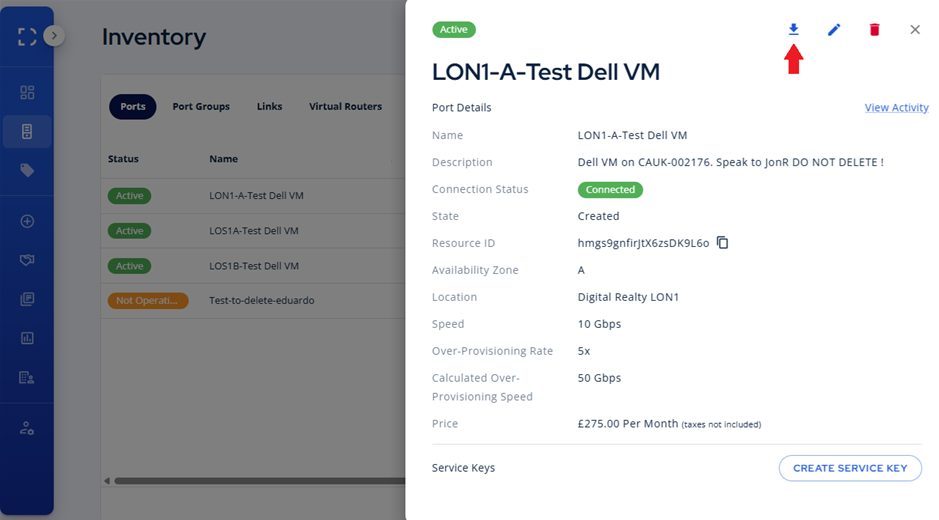

- Click on Inventory in the navigation panel.
- Choose the port or port group for which you need an LOA.
- From the port information popup, click the Physical Connection tab and download button
- If this is a Port Group, you can select each LOA individually or as a group.

NOTE: In some cases your LOA may not be ready for download for up to 24 hours after creation. This applies only to some of our 3rd party integrated partners. You will be notified as soon as the LOA becomes available for download.
Metro Connect#
There are a few additional A-side questions that must be addressed if your port or port group requires a Metro Connect.
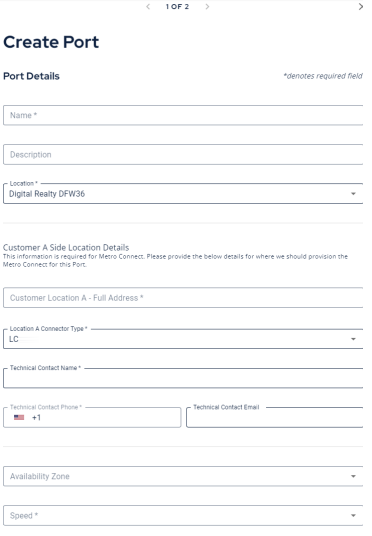
- Fill out the additional fields required to assist with the Metro Connect process.
- Once submitted, when you doanload the LOA it will come with an additional file per port. You will need to upload both pages for your Metro Connect.