Creating Virtual Routers#
Virtual Routers are the heart of layer 3 connections on the ServiceFabric platform. You can easily connect your virtual routers to our cloud onramps, other ports, even the Internet. To get started, create a virtual router.
Some Common Use Cases#
- Enable BGP routing on a virtual router to avoid having to run BGP on your equipment.
- Combining or flattening VLAN traffic (i.e., stripping VLAN tagging when using VLAN tunneling (QinQ) or receiving traffic from multiple CSPs on a single VLAN to CPE). _ Network Address Translation NAT to hide your traffic (usually RFC1918 address space) behind Public IP addresses, which may be required for CSPs that only use Public IP space for their services (e.g., SFDC).
Creating a Virtual Router#
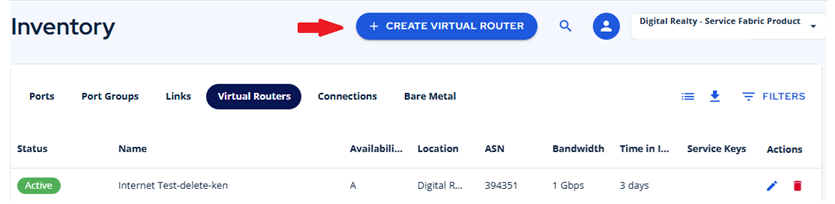
- Click the Service Builder icon on the left and click the Create Virtual Router option navigation panel or the CREATE VIRTUAL ROUTER button found in Inventory under the Virtual Router tab.
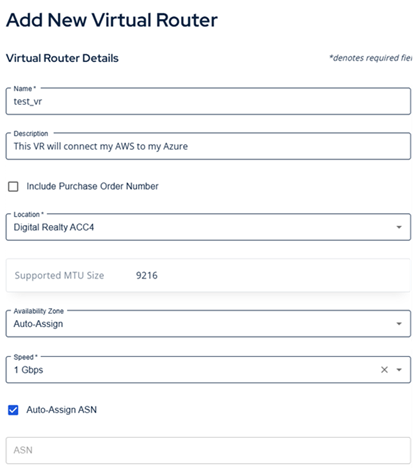
- Give your virtual router a Name and a Description
- Purchase Order Number: Add a PO# that will be appended to the ServiceFabric bill. Enable the checkbox and enter your PO#.
- Select a location where you want your VR sourced.
- Note the supported MTU size.
- Select an Availability Zone or allow ServiceFabric to select one for you.
- Choose a speed.
- When you are satisfied, click the CREATE VITUAL ROUTER button at the bottom of the form to begin the creation process.