ServiceFabric MCP Server#
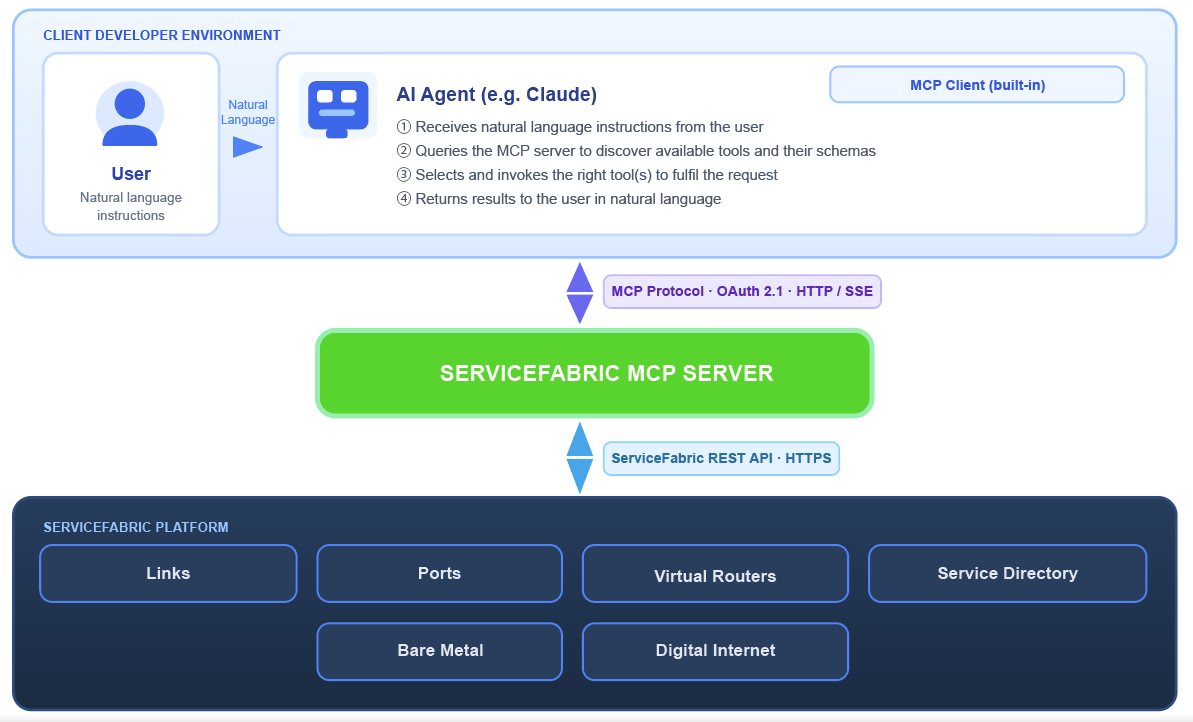
ServiceFabric MCP (Model Context Protocol) servers expose a standardized interface that AI assistants and developer tools can use to interact with the ServiceFabric API. Built on an open protocol, MCP enables structured, secure access to external services — letting clients perform operations against your ServiceFabric resources in a consistent way.
Notice: ServiceFabric MCP is currently in early access.
Available MCP Servers#
Detail instructions on how to install the MCP server and associated skills can be found in our public pureport/service-fabric-skills git repository hosted on Github.
service-fabric#
Scope: Read-Only
Domains: Network, topology, telemetry, bare metal, internet, admin, organization, pricing, service directory, logs
URL: https://api.servicefabric.com/mcp/service-fabric/mcp
service-fabric-rw#
Scope: Read-Write
Domains: Network mutations, bare metal lifecycle, internet services, admin users
URL: https://api.servicefabric.com/mcp/service-fabric-rw/mcp
Prerequisites#
In order to use the ServiceFabric MCP Server, you will need:
- A ServiceFabric portal account
- A compatible MCP Client Agent
Recommendations#
Models#
For better results, use the following Models:
- Opus 4.7+ / Sonnet 4.6+
- Gemini 2.5 Pro
- ChatGPT 5.4+ (base)
MCP Clients#
For the best operator experience, use these skills with a review-oriented agent harness such as:
- Claude Code (MVP)
Important: Only authenticate to ServiceFabric MCP servers through clients you installed and trust.
Important Notes#
Scope and usage#
The MCP client will use a standard SSO login flow for authentication. When authenticated, it will grant the MCP client the ability to call ServiceFabric APIs on your behalf. If your account has broad administrative privileges, the MCP server inherits them. To limit exposure, we strongly recommend authenticating with a dedicated MCP user instead of your personal or admin account.
Important: The MCP server calls ServiceFabric APIs using your credentials. Every action it takes is executed as you, with the same permissions as your account.
Allowed Actions and Filtering#
The MCP Server can perform any actions allowed by the account's permissions; Use it only in a controlled environment when testing.
ServiceFabric offers a wide range of tools and capabilities. To achieve optimal performance and ensure cost‑effective usage, it is recommended to carefully filter only the features that are relevant to your specific applications.