ServiceFabric® Model Context Protocol (MCP) Server#
Digital Realty is now offering customers a chance to connect agents to our own MCP Server. MCP is a framework that exposes infrastructure as a programmable layer for Private AI. ServiceFabric MCP extends Digital Realty's global foundation of capacity, open interconnection, and sovereign-aware infrastructure with programmable controls designed for enterprise AI environments. AI Private Exchange (AIPx), the underlying architecture, is patented for the agentic control and policy mechanisms that make programmable infrastructure interaction possible.
The Service Fabric MCP Server is a Model Context Protocol (MCP) compliant server that exposes Digital Realty's ServiceFabric® API to AI-powered developer tools and agents. It acts as a structured interface between AI clients and the ServiceFabric REST API, enabling intelligent querying, operational analysis, and real-time observability of network resources, services, and configurations.
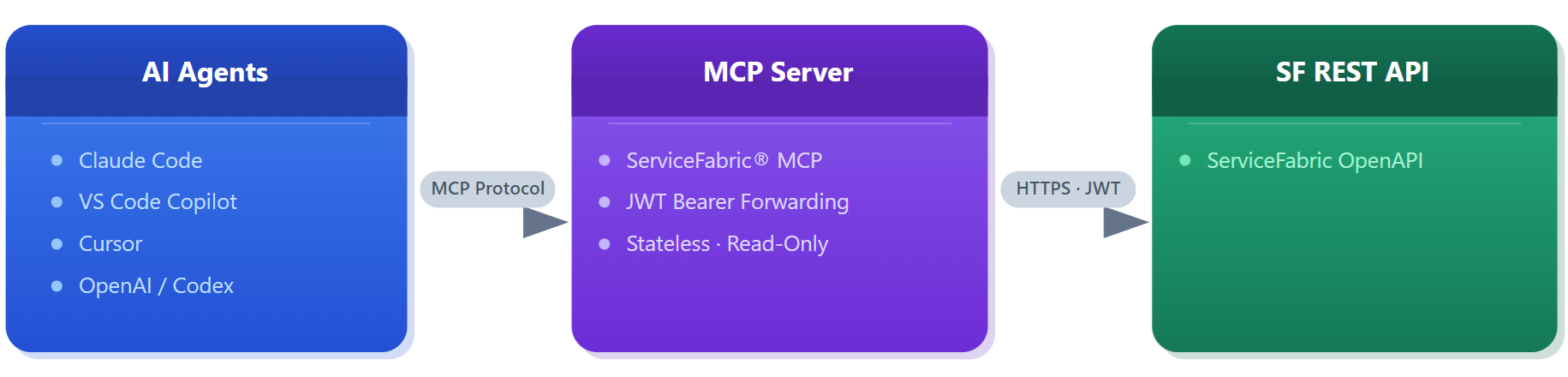
Network operations teams and platform engineers increasingly rely on AI coding assistants and autonomous agents for day-to-day work. Today, those tools have no structured access to ServiceFabric data. Engineers must context-switch to the portal or issue raw API calls to answer questions that an AI agent could otherwise resolve in seconds. The SF MCP Server closes this gap by making the entire ServiceFabric resource model to query through natural language, in the tools engineers already use.
Beyond individual productivity, the MCP standard creates a single integration point that serves all compliant AI clients simultaneously. Rather than building bespoke connectors for Claude, Copilot, Cursor, and Codex separately, one MCP server satisfies all of them and any future client that adopts the protocol.
The first release establishes the foundational layer, a stable, read-only interface that gives AI clients structured access to live network topology data and real-time operational metrics. This version covers Virtual Routers, Connections, Links, Ports, Port Groups, BMS and Internet services, alongside full routing state (BGP sessions, BGP routes, IP routes, static routes) and metrics for all supported resource types (bitrate, packet count, error count, optical light levels). Audit and system logs are also included.
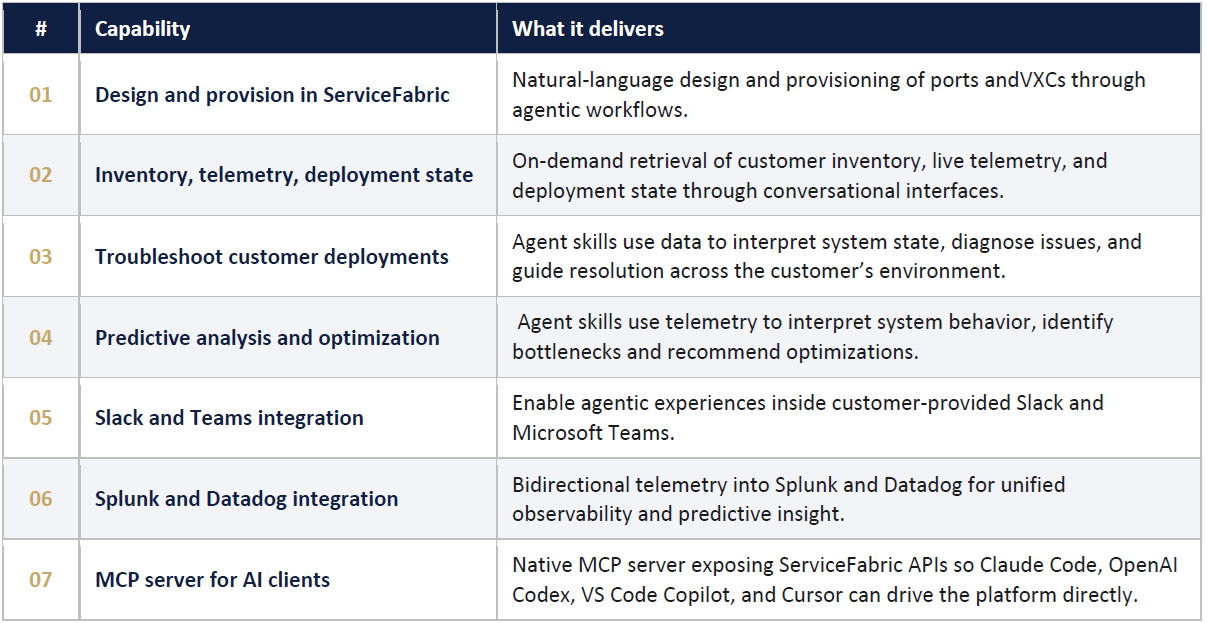
Seven Capabilities at Launch#
Use Cases#
Network Operations and Incident Response#
Network engineers and SRE/NOC teams are among the most immediate beneficiaries of the SF MCP Server. Rather than manually correlating data across dashboards and API calls during an incident, an engineer can ask an AI agent directly.
Example: to show the BGP sessions for a given virtual router and flag any that are down, or to determine whether traffic on a specific port has spiked in the last hour. The agent queries the relevant metric, BGP session, or routing report tools and returns a structured summary in seconds. This Agent can autonomously be polling virtual router metrics and BGP session reports to surface anomalies and alerts without any human-initiated query.
Network Design and Architecture Analysis#
Solutions architects and platform operators use the MCP Server to gain AI-assisted insight into live network topologies. An architect can ask an AI agent to describe the full topology of an organization’s network. This includes all virtual routers, their BGP connections, and the cloud provider ports they terminate on. SAs then receive a coherent summary drawn from multiple MCP tool calls.
Example: An engineer using a custom tool to get all network topologies within a specified account, generating a graphical representation of the network architecture, including Sites, Ports, IP addresses, VLANs, Routing etc.
Service Directory and Marketplace analysis#
Developers can create tools to access the ServiceFabric Service Directory and explore partner connection opportunities. Typical use cases include discovering providers in a target metro, filtering by service category (e.g., cloud on ramp, IX, etc.), including services that are C2C (Click to Connect) ready, and retrieving contact and entitlement details for partner onboarding.
Example: A commercial representative uses a ServiceFabric tool to discover partners that offer the required services. The search accepts a short description and key parameters (e.g., metro, category, C2C readiness) to filter to the desired application requirements.
Building an end-to-end network application#
Customers can use a tool to build, verify, and deploy network designs in ServiceFabric based on the intended application, network requirements, locations, and other parameters. The tool designs a solution, requests specific parameters, and offers options for the user to decide if the proposed design can be deployed. Upon acceptance, the tool deploys an end-to-end topology.
Example: An organization needs to implement a 1Gbps link between DAL10 and LON3. The user, without prior ServiceFabric knowledge, uses the tool to describe the intention, and a design is proposed. The user accepts the proposal, and the tool deploys the network in ServiceFabric.
Design and estimate costs#
Customers can use a tool to get designs and the associated costs of the proposed design. User can ask for alternatives to reduce cost and optimize utilization, per example, the user can iterate on constraints (e.g., reduce cross metro links or prefer IX on ramps) and receive updated designs and estimates, all without write operations.
Example: Ask the MCP agent: "Design a cost optimized 1 Gbps connectivity between DAL10 and LON3 using existing ports and virtual routers. Compare options (VR-based vs direct link), estimate monthly cost, and recommend the lowest cost design that meets 99.9% availability." The agent calls read only tools to enumerate ports, links, connections, and pricing summaries, then returns a design proposal with trade offs and a cost estimate.
Getting More Information#
For more information on using the MCP feature of ServiceFabric, please refer to the online User Guide for MCP.
Notice: ServiceFabric MCP is currently in early access. Please contact our Support team to request access and obtain further information.